Velocity Labs

Mobile app code audit

A mobile app code audit for what ships to every phone.

Anything in your app ends up on every device that installs it, and the app stores keep raising the bar. We review your React Native, Expo, Flutter, Swift, or Kotlin code against the problems mobile apps actually have, and tell you in plain English which ones matter and what to fix first.

What a mobile app code audit checks

Every mobile audit covers the eight areas in every code audit, plus checks written for React Native, Flutter, iOS, and Android.

  • Secrets in the app bundle

    Payment, AI, database, and email keys compiled into the app, where anyone can pull them out, and paid APIs the app calls directly instead of through your server.

  • Tokens and data on the device

    Sign-in tokens in plain storage instead of the Keychain or Keystore, local databases left unencrypted, and data and push tokens that stay behind after logout.

  • Deep links, WebViews, and redirects

    Links that open screens or take actions without checks, sign-in redirects another app can intercept, and WebViews that load untrusted pages with a bridge into the app.

  • Network and platform settings

    Cleartext traffic and security exceptions, exported Android components, backups and debug flags, permissions nothing uses, and logging left in release builds.

  • Speed and stability

    Long lists that render everything, work that blocks the UI, oversized images and slow startup, and crash reporting that can’t tell you where a crash happened.

  • Store and version requirements

    Target SDK and Xcode requirements, privacy manifests and data labels, in-app account deletion, signing keys and store account ownership, and a way to force an update.

More than a scanner report

Every audit runs scanners like gitleaks, osv-scanner, and Semgrep against your code, but few scanners understand mobile app configuration, and the best ones need a built app. The findings that hurt most in mobile apps are usually ones a scanner can’t see:

  • A server key in an environment variable that the build inlines into the app
  • A deep link that opens a payment screen with whatever the link says
  • A login token left in plain storage after the user signs out
  • An app with no minimum version, so a broken release stays on phones for months

Those come from reading the code, and from building and shipping mobile apps of our own.

Mobile app code audit pricing

Three levels, each a fixed fee. Essentials covers the most important mobile checks; Standard and Comprehensive cover all of them. See everything every audit includes.

Essentials

A fast health check

$1,000 fixed fee

Best for: Answering "is this codebase OK?" before you buy, hire, or launch.

  • Review of your code, configuration, CI, and database schema
  • Automated scans for security issues, vulnerable and outdated dependencies, leaked secrets, and code quality
  • The essential checks for each technology in your stack
  • Critical and high findings written up in full
Order Essentials

Comprehensive

Due diligence depth

$2,500 fixed fee

Best for: Acquisitions and technical due diligence, compliance preparation, or after an incident.

Everything in Standard, plus:

  • Line-by-line review of sign-in, payments, and data access
  • Steps to reproduce every finding
  • Your public website: accessibility, search visibility, and security headers
  • Domain and email setup: DNS, SPF, DKIM, and DMARC
Order Comprehensive

Is your mobile stack still supported?

React Native maintains only its latest three minor releases, Expo ships about three SDKs a year, and Flutter fixes only its current stable release. Every mobile audit checks your framework and SDK versions against the official support policies, and your native libraries against the versions you’re on.

The stores force upgrades too: Google Play now requires new apps and updates to target Android 16 (API level 36), and Apple requires builds from Xcode 26. If you’re behind, the report lays out the upgrade step by step, and Standard and Comprehensive also list the libraries that stand in the way. When you’re ready, we can do the upgrade too.

Expo SDK support today Latest: 58.0.25
  • Expo SDK 58 Supported
    Released
    Oct 15, 2026
    React Native
    0.88
  • Expo SDK 57 Supported
    Released
    Jun 30, 2026
    React Native
    0.86
  • Expo SDK 56 Unsupported
    Released
    May 21, 2026
    React Native
    0.85
  • Expo SDK 55 and older Unsupported
    Released
    Feb 25, 2026 and earlier
    React Native
    0.83 and older

Checked November 13, 2026 against the Expo SDK versions.

A mobile app we've built

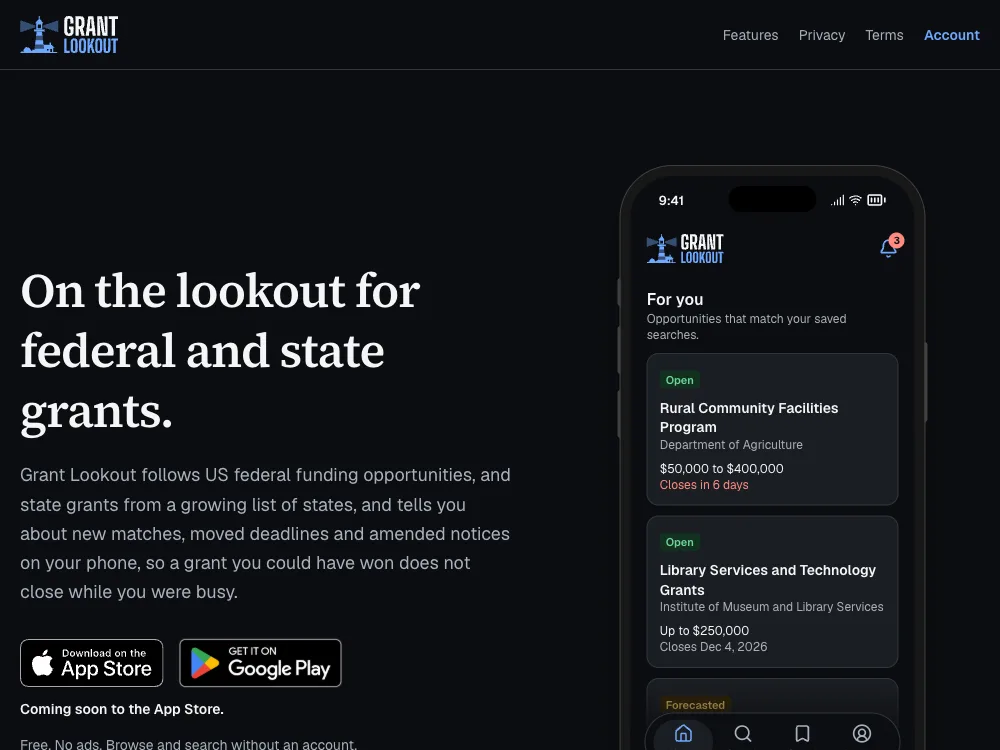
The Grant Lookout website:

Grant Lookout

Follows federal and state grant opportunities and tells you on your phone about new matches, moved deadlines and amended notices, with AI summaries of long notices. Android and iOS apps, with a web admin area.

Questions about mobile app code audits

How much does a mobile app code audit cost?

The same fixed fees as every audit: $1,000 for Essentials, $1,500 for Standard, and $2,500 for Comprehensive. Compare the levels. Hire us for hourly development within 30 days of your report and up to $1,000 of the fee comes off your first invoice.

Do you audit Flutter and native iOS and Android apps?

Yes. React Native and Expo, Flutter, native iOS in Swift, and native Android in Kotlin each have their own checklist, covering the same ground: secrets, storage, deep links, WebViews, performance, dependencies, and store requirements.

Is the back end or API included?

If it’s in the code you share, yes. Most mobile apps talk to an API, and many of the worst problems live there, so we can review both together. The back end gets the checks for its own stack, like Rails, Node.js, or Django.

Do you need a build of the app?

No, but it helps. The source code settles most checks. A release build (APK, AAB, or IPA) shows what really ships, like keys bundled into the app. We only inspect it as data and never install or run it on our own machines.

Will the audit help with app store rejections?

It checks the requirements that most often block a release: target SDK and Xcode versions, privacy manifests, data safety and privacy labels, in-app account deletion, and permissions the app declares but doesn’t use.

Can you fix what the audit finds?

Yes. We can work alongside your team or take it on ourselves, and the audit credit applies.

Order a mobile app code audit

Tell us about your mobile app and we'll recommend the level that fits.

Prefer to talk first? Book a 30-minute call